
PixelLab vs Pixler
Both tools make game-ready pixel art and animate characters. Here is an honest look at where each one is stronger, so you can pick the right one for your game.
Made with Pixler
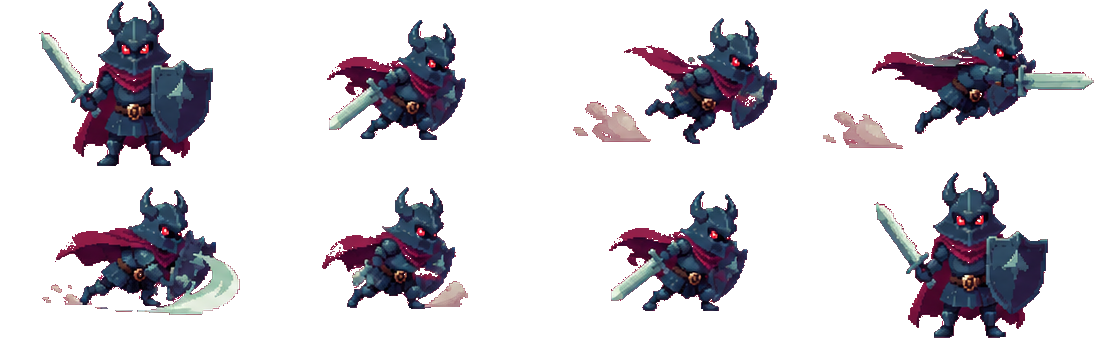


PixelLab is the best-known AI pixel art tool for games, with deep character tooling — skeletal rigging, multi-direction rotation, tilesets and an API — on plans from $12/month. Pixler covers the same core job — game-ready characters, items, backgrounds and tilesets, plus sprite-sheet animation of any sprite, including ones you upload — on plans from $8/month, and is built to be driven from coding agents such as Claude Code, Cursor and Codex over MCP. If you need rigging or 4/8-direction characters today, PixelLab is the stronger pick; if you want sprites and animation at a lower price, or want your agent to make the art, Pixler fits better.
Where Pixler is stronger
A lower entry price ($8/month vs $12/month), animations drawn from the same credit pool as images (about 160 a month on the $8 plan), animation of sprites you upload, 17 fixed palettes such as NES, Game Boy and PICO-8 to lock a whole set to one look, and backgrounds up to 1920×1080 or portrait for mobile.
Where PixelLab is stronger
Skeletal rigging, 4- and 8-direction character rotation, and finer control over view, direction, outline and shading. If your game needs the same character from every angle right now, PixelLab is the better pipeline — Pixler does not have rotation yet.
Animation
Pixler animates any sprite — generated or uploaded — into a transparent PNG sprite sheet with 11 presets (idle, walk, run, jump, crouch, attack, cast, hurt, death, float, turnaround) or a custom motion described in words, 2–16 frames, and lets you pick which frames to keep.
Made for coding agents
Pixler's remote MCP server gives Claude Code, Cursor, Codex, VS Code, Windsurf, Zed, Gemini CLI, OpenCode, Warp and Claude Desktop the tools to generate, edit and animate pixel art and save the PNGs straight into your game project. A REST API with an OpenAPI spec covers the same jobs.
pixler.dev vs PixelLab
| pixler.dev | PixelLab | |
|---|---|---|
| Price | From $8/mo (800 credits) | From $12/mo |
| Try before paying | Small free tier | Trial (40 generations) |
| Text-to-pixel-art | ||
| Reference image input | Up to 3 images | |
| Characters, items, backgrounds | ||
| Tilesets (terrain, platforms, paths) | ||
| Tiled and Godot tileset export | ||
| Animation & sprite sheets | 11 presets + custom motion | |
| Skeletal rigging | ||
| 4/8-direction rotation | ||
| REST API | ||
| Commercial use | Yes, no attribution | Yes |
| Best for | Sprites, items, tilesets and animation on a budget; agent-driven workflows | Rigged and multi-direction characters |
Comparison based on publicly available information as of October 2026. PixelLab is a trademark of its respective owner; pixler.dev is not affiliated with PixelLab.
Frequently asked questions
Is Pixler a good PixelLab alternative?
For game sprites, items, tilesets, backgrounds and sprite-sheet animation, yes — at a lower price, with animation of uploaded sprites and an MCP server for coding agents. For skeletal rigging and 4/8-direction character rotation, PixelLab is the stronger choice today.
Does Pixler support a pixel art API or MCP?
Yes. Use the REST API in your own tools, or connect a coding agent through the remote MCP server — setup guides cover Claude Code, Cursor, Codex, VS Code and six more clients. Access is included on every plan and uses the same balance as the website.
Does Pixler do animation like PixelLab?
Both animate characters. Pixler turns any sprite — generated or uploaded — into a sprite sheet with 11 presets or a custom text motion. PixelLab adds skeletal rigging and multi-direction rotation; if you need those, it's the better fit.
Is Pixler cheaper than PixelLab?
Pixler plans start at $8/month for 800 credits, with an animation costing 5 credits, so about 160 animations a month. PixelLab plans start at $12/month.
Can I use the art commercially?
Yes. Art generated on pixler.dev can be used in commercial games and products without attribution.
Which should I choose?
Choose Pixler for game sprites, items, tilesets and animation at a lower price, or if you want your coding agent to generate and drop art into the project. Choose PixelLab if you need skeletal rigging and characters rotated to 4 or 8 directions.
Ready to make some pixel art?
Sprites, items, tiles, backgrounds and animation in one place.
Open generator