
Pixel art sprite generator
Describe a character and get a game-ready pixel sprite in seconds — a transparent PNG you can drop straight into Godot, Unity or GameMaker, then animate into a sprite sheet.
Sprites generated with pixler.dev
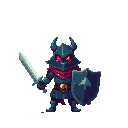


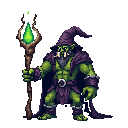



pixler.dev is a pixel art sprite generator built for game developers. Type a prompt — "goblin warrior with a club", "space marine in blue armor" — and the model returns a true pixel-perfect character sprite with a transparent background, already cut out and ready to use. It runs in your browser at sizes from 16 up to 256 pixels, so sprites drop straight into your engine with nothing to clean up.
From a text prompt to a sprite
Write a short prompt and pick a size. The model is tuned specifically for pixel art, so you get full-body character sprites with bold outlines and crisp nearest-neighbor edges — not a blurry raster image that needs downscaling.
Transparent PNGs, engine-ready
Every sprite comes out as a PNG with the background already removed. Import it straight into Godot, Unity, GameMaker, Phaser, LÖVE or Construct and set the texture filter to nearest for pixel-perfect edges.
Pick your sprite size
Generate sprites at 16, 32, 64, 128 or 256 pixels square, with multiple variations per prompt — so you can match the resolution your game already uses and pick the best take.
One look across the set
Lock a palette such as Game Boy, NES or PICO-8, keep one style and save it as a project, so every new sprite matches the ones you already have. Sprites can be used in commercial games without attribution.
Frequently asked questions
How much does it cost?
Plans start at $8/month for 800 credits — one per image, five per animation, so about 160 animations a month. Legendary is $20/month for 2,500, Mythic $45/month for 6,000. A free tier (up to 5 images a day, 50 a month) lets you try the generator first, and one-time credit packs start at $6.
Do I need an account to make sprites?
No. You can start generating sprites immediately in your browser without signing up or providing an email address.
What sprite sizes can it generate?
16, 32, 64, 128 and 256 pixels square. Every sprite is a PNG with crisp pixel edges and a transparent background.
Can I use the sprites in a commercial game?
Yes. Sprites generated on pixler.dev can be used in commercial games and products without attribution.
Does it work with Unity and Godot?
Yes. Sprites import directly into Unity, Godot, GameMaker, Phaser, LÖVE, Construct and any engine that accepts PNG. Set the texture filter to 'nearest' to keep pixel-perfect edges.
Does it make animated sprites or sprite sheets?
Yes. Generate a sprite or upload your own, then animate it into a sprite sheet with one of 11 presets — idle, walk, run, attack and more — or a custom text motion. See the pixel art animation generator for details.
How is it different from a general AI image generator?
Tools like Midjourney and DALL·E produce high-resolution raster art that needs post-processing to look like real pixel art. pixler.dev outputs true pixel-perfect sprites at game-engine sizes with transparent backgrounds — ready to drop in with no conversion.
Ready to make some pixel art?
Sprites, items, tiles, backgrounds and animation in one place.
Open generator